





Step 1: Bootstrap your app with create-t3-app
Follow the interactive instructions at create.t3.gg and explicitly select Tailwind CSS, Prisma, and NextAuth.js when prompted.
After scaffolding with those options, you should have a project with Next.js, Tailwind CSS, Prisma, and NextAuth.js.
Step 2: Add some standard code
In Ur, we have some specific things we add to each project:
- A module folder for each "area" of business logic.
- A ToastContext with an associated "hook" and "Provider" to easily display toasts in the app.
- A combination of twMerge and classNames .
- An AppShell component used to draw the application's shell (header and sidebar).
- A number of libraries we use, such as react-hook-form .
Add what you feel you need to your project to be able to work productively.
Step 3: Find out what you want to make
The question you now have to ask yourself is: What do you want to make? Is it a CRUD screen? A shape? A table? A list? Think in terms of functionality: What does my app need?
The next step is to go to TailwindUI's component list and find the components that can best be used to create the functionality you want. Let's say that we want to create a simple screen with statistics, and that we thus need simple stats in cards- component.
Select "React" and copy the code.
Step 4: ChatGPT
Start your session with ChatGPT by giving the following prompt (or similar):
I want you to assist me with taking examples from TailwindUI and creating reusable Typescript React components from them. I want you to take the data fields that are shown in the examples and use them as reference for the required props of the components.
You can replace the "classNames" function with a custom function we already have in our library also called "classNames". It can be imported from ~/util/classNames. Please stand by while I find a component to copy to you.
ChatGPT tends to be quite wordy, so if like me you want short answers, copy this instead: ``
I want you to assist me with taking examples from TailwindUI and creating reusable Typescript React components from them. I want you to take the data fields that are shown in the examples and use them as reference for the required props of the components.
You can replace the "classNames" function with a custom function we already have in our library also called "classNames". It can be imported from ~/util/classNames. Please stand by while I find a component to copy to you. Please be short and concise in your answers, you should only need to provide me with the code.
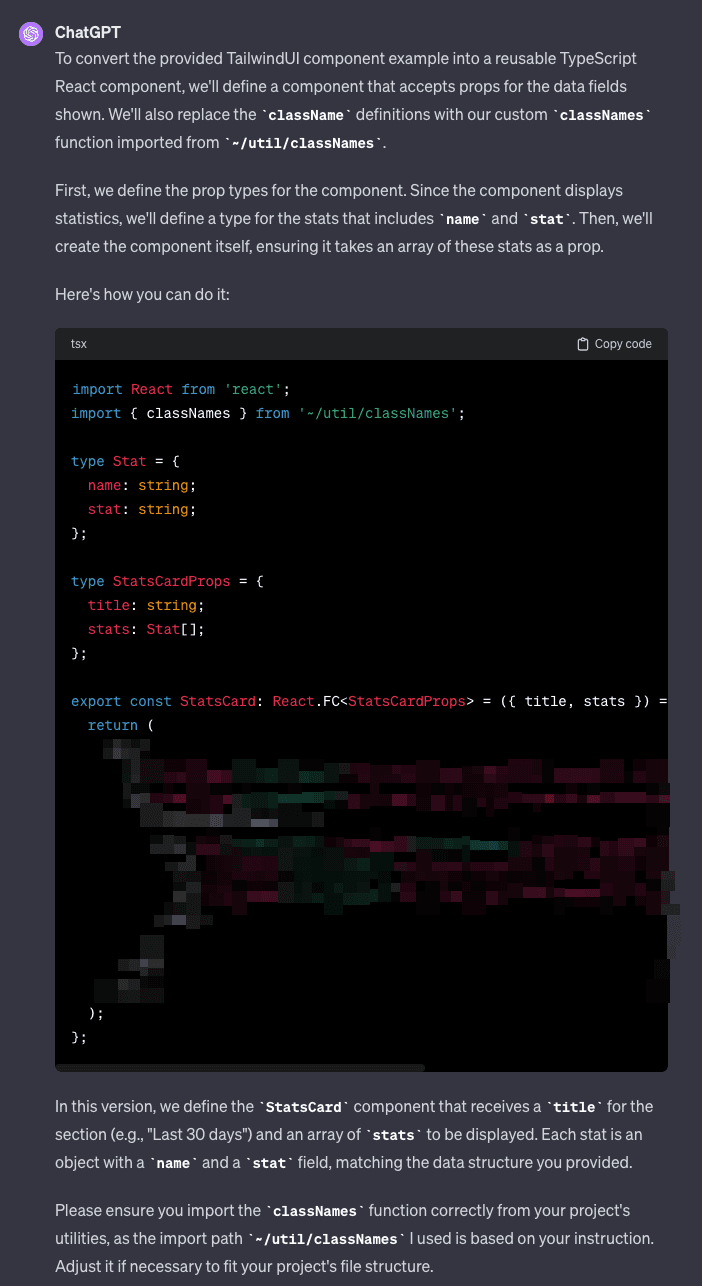
Then take the component you want converted to a reusable version and copy it into ChatGPT.
This should result in a component that you can easily use in your app.
After doing this a few times, you'll have a bunch of reusable Typescript React components that can be used for other things. Which can be extremely useful. All you had to do was ask nicely.
Step 5: Add implementation
The next step means that you have to put in some effort yourself, and implement the functionality that you should actually have. Create a new Next page in your app, connect it to a tRPC endpoint if that's what you want, and show some stats with your new component.
This is the last step of this method. When you're done with the functionality you've been working on, go back to step 3 and repeat steps 3-5 as many times as you need until you've finished the prototype.
Step 6: Bonus step I, tailoring
All TailwindUI components use indigo as the default color, and has specific opinions about padding, margins, colors, rounding, and more. Personally, I like these default choices.
If you'd rather put your own touch on the look, you can use your IDE to make larger search/replace commands. For example, by replacing "indigo" with "emerald". At the same time, you can also ask ChatGPT to do this for you.
Replace the prompt in step 4 with the following (see the highlighted text): ``
I want you to assist me with taking examples from TailwindUI and creating reusable Typescript React components from them. I want you to take the data fields that are shown in the examples and use them as reference for the required props of the components.
You can replace the "classNames" function with a custom function we already have in our library also called "classNames". It can be imported from ~/util/classNames. Please stand by while I find a component to copy to you.
Please swap the use of the "indigo" color to use "emerald" instead. Also I want you to remove all rounding from the components, and wherever there is a title, it should use the font "Playfair Display".
Please be short and concise in your answers, you should only need to provide me with the code.
ChatGPT should now provide you with components that are more geared towards the specific style you request.
Step 7: Bonus step II, hosting
You may want to show off your new prototype to friends, family or customers.
The fastest way to get your t3 app live is to use Vercel and Supabase for hosting, and any DNS provider.
See the following resources to set this up:
You can expect us to write a separate guide about this on this website very soon.
What should you expect?
If you are a reasonably experienced developer, you should be able to prototype a web app with basic functionality in less than a day. Depending on the level of ambition, of course.
In Ur Solutions, we have used the above methodology to create a web app that we actively use as of today to manage our liquidity. Developing this app a few years back would have taken months of work, whereas today we were able to get an initial version up in just a few days.
Coming soon
In part 2 of this article series, we will use FloatUI with the method shown here to create a simple web app and host it on Vercel and Supabase.
Follow along!


